Your ASP.NET Application Is Running. But Is It Holding You Back?
Many enterprise applications still run on ASP.NET (.NET Framework). They are stable. They are functional. They generate revenue. But they are also increasingly expensive, difficult to scale, and misaligned with modern cloud-native architecture.
Running legacy ASP.NET today is like using a flip phone in a smartphone world. It works. But it limits growth, agility, and competitive advantage.
ASP.NET Core on .NET 8 or .NET 9 changes that equation. It is cross-platform, container-ready, cloud-native, high-performance, and optimized for modern DevOps workflows.
For CIOs and CTOs, the question is no longer whether to migrate from ASP.NET to .NET Core. The question is when and how to do it with minimal risk and maximum ROI.
This guide breaks down:
- Why enterprise leaders are accelerating ASP.NET Core migration
- The business case with measurable ROI
- Side-by-side comparison of ASP.NET vs ASP.NET Core
- Proven migration strategies
- Common roadblocks and how to fix them
- A structured 4-phase roadmap
- How ISHIR helps enterprises modernize safely and strategically
Why Enterprises Are Moving from ASP.NET to .NET Core
1. Infrastructure Savings: 20–40% Cloud Cost Reduction
ASP.NET Core is lightweight and runs efficiently on Linux containers.
Unlike .NET Framework, which is tightly coupled with Windows Server and IIS, ASP.NET Core can run on:
- Linux
- Docker containers
- Kubernetes clusters
- Cloud-native PaaS environments
This eliminates expensive Windows Server licensing costs and reduces infrastructure overhead. For enterprises running large-scale workloads, this translates into 20–40% lower cloud hosting costs.
If your application footprint is large, that savings compounds quickly.
2. Performance Boost: 3–5x Throughput
ASP.NET Core is significantly faster than ASP.NET (.NET Framework).
In many real-world enterprise workloads, organizations experience:
- 3–5x more requests per second
- Lower memory consumption
- Faster response times
For e-commerce platforms, this means handling peak events like Black Friday without crashes. For fintech platforms, faster transactions mean higher trading throughput and increased revenue. For SaaS products, improved latency improves customer retention and reduces churn.
Performance is not a technical luxury. It is a revenue driver.
3. Developer Productivity: Ship 2x Faster
ASP.NET Core was built for modern development.
It includes:
- Built-in Dependency Injection
- Modular middleware pipeline
- Cleaner configuration model
- Modern C# features such as records and pattern matching
- Reduced boilerplate code
Teams spend less time debugging legacy System. Web dependencies and more time building new features. Enterprises often see 2x faster feature delivery after legacy modernization.
In a competitive market, time-to-market is a strategic differentiator.
4. Future-Proofing and Security
Microsoft has ended support for .NET Framework.
Remaining on legacy ASP.NET introduces:
- Security risks
- Limited platform updates
- Shrinking developer talent pool
- Compatibility issues with modern libraries
Most skilled developers prefer working with ASP.NET Core and modern .NET versions. Staying on .NET Framework increases long-term hiring and retention challenges.
Modernization is not optional. It is risk mitigation.
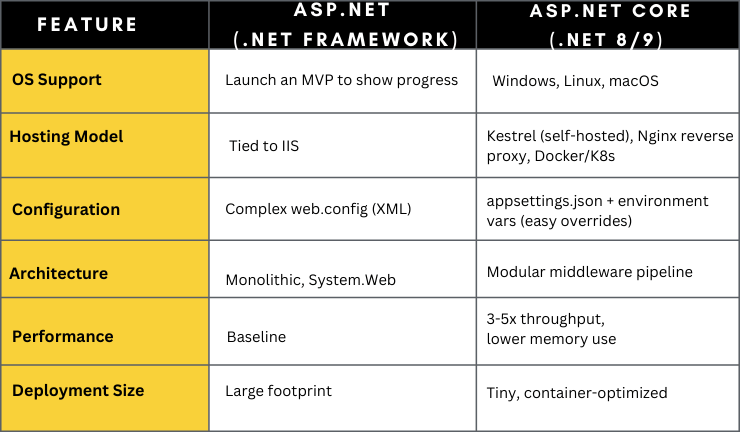
ASP.NET vs ASP.NET Core: A Clear Comparison

3 Proven ASP.NET to .NET Core Migration Strategies
There is no universal migration template. The right strategy depends on your application architecture, business priorities, technical debt level, compliance requirements, and acceptable risk threshold. Enterprise modernization should be deliberate, measurable, and aligned with ROI.
1. Incremental Replacement: Zero Downtime Modernization
This approach is best suited for large monolithic enterprise systems that cannot afford service disruption.
Incremental replacement works by placing YARP (Yet Another Reverse Proxy) in front of the existing application. The proxy intelligently routes specific requests to newly built ASP.NET Core components while legacy ASP.NET modules continue operating. Over time, low-risk APIs and services are replaced first, followed by progressively critical components.
This strategy eliminates the need for a big-bang rewrite. It allows production systems to remain stable while modernization occurs in controlled phases. Monitoring tools such as Application Insights ensure visibility across both legacy and modern components during transition.
For mission-critical systems where uptime is non-negotiable, incremental replacement offers a practical and low-risk migration path.
2. Refactor: Balanced Upgrade with Controlled ROI
Refactoring is appropriate for applications that are structurally maintainable but constrained by outdated framework dependencies.
In this approach, business logic is extracted into shared class libraries that are compatible with modern .NET versions. Dependencies on System.Web are replaced with ASP.NET Core middleware. Authentication is migrated using modern constructs such as app.UseAuthentication(). Data access layers are upgraded to Entity Framework Core, ensuring improved performance and long-term support.
This method preserves domain logic while modernizing infrastructure and application layers. It avoids the cost and risk of a complete rebuild while still delivering performance improvements, security upgrades, and operational efficiency.
Organizations that adopt refactoring typically achieve measurable ROI within one to two years, especially when infrastructure savings and productivity gains are factored in.
3. Rebuild: Full Cloud-Native Transformation
A full rebuild is appropriate when legacy architecture is actively blocking innovation, scalability, or cloud adoption goals.
This strategy involves decomposing the monolithic application into microservices aligned with business domains. Services are containerized using Docker and orchestrated through Kubernetes or a similar platform. Event-driven architecture patterns are introduced using tools such as RabbitMQ to enable decoupled communication between services. Domain-Driven Design principles guide service boundaries and business logic structuring.
While this approach requires higher upfront investment and planning, it unlocks maximum scalability, resilience, and agility. It is particularly suitable for organizations undergoing digital transformation, launching new SaaS platforms, or expanding into high-growth markets.
A rebuild is not simply a technical rewrite. It is a strategic repositioning of the application architecture to support long-term competitive advantage.
A 4-Phase Roadmap for ASP.NET to .NET Core Migration
A structured migration roadmap reduces operational risk, improves predictability, and ensures measurable ROI. ASP.NET to .NET Core migration is not simply a technical upgrade. It is a strategic modernization initiative that must be executed in phases.
Phase 1: Assessment
Every successful migration begins with a comprehensive technical and business assessment.
Start by running the .NET Upgrade Assistant and using the dotnet try-convert CLI tool to evaluate your existing solution. These tools identify breaking changes, unsupported APIs, and compatibility issues. Conduct a full inventory of APIs, third-party dependencies, authentication systems, and infrastructure configurations.
Each application module should be scored based on business value, technical complexity, and modernization urgency. A proof-of-concept on a single, contained module helps validate assumptions and estimate effort accurately. This phase provides leadership with visibility into cost, risk, and expected ROI before major investment begins.
Skipping assessment leads to budget overruns and unnecessary disruption. Precision here reduces risk later.
Phase 2: Foundation
Before code migration begins, the modernization foundation must be established.
This includes setting up CI/CD pipelines using GitHub Actions or Azure DevOps to support automated builds and deployments. Containerization using Docker should be introduced early to ensure alignment with cloud-native deployment models. Organizations migrating to Azure, AWS, or other cloud platforms should configure container registries such as Azure Container Registry and validate deployment workflows.
Developer enablement is equally critical. Teams should receive structured training on ASP.NET Core fundamentals, middleware architecture, dependency injection patterns, and configuration management. Microsoft Learn and internal enablement workshops accelerate this transition.
Modernization is not just about rewriting code. It requires operational readiness, DevOps alignment, and team capability upgrades.
Phase 3: Execution
Execution should follow a controlled, bottom-up approach to reduce system-wide impact.
Begin by migrating shared libraries and non-UI components that have minimal external dependencies. Once foundational components are stable, move to API layers and business services. The UI layer should be migrated last, particularly if WebForms replacement or front-end redesign is involved.
Feature flags should be implemented to allow controlled rollout of new functionality. This enables gradual exposure to users and quick rollback if needed. Automated testing frameworks such as xUnit should validate business logic, while end-to-end testing tools like Playwright ensure user experience integrity.
Iterative deployments with measurable performance benchmarks allow leadership to track modernization progress in real time.
Phase 4: Optimization and Go-Live
Migration does not end at deployment. Optimization ensures the modernization investment delivers tangible business value.
OpenTelemetry should be integrated to provide visibility into traces, metrics, and application health. Kestrel server configurations must be tuned for optimal throughput and connection handling. Performance testing and A/B benchmarking should validate improvements in latency, memory usage, and scalability.
Blue-green deployment strategies allow seamless production cutover with minimal disruption. Once performance, stability, and cost benchmarks are validated, the legacy environment can be safely decommissioned.
A structured go-live ensures modernization translates into real-world gains in performance, cost efficiency, and operational agility.
Pain Points CIOs and CTOs Face Today
- Escalating cloud hosting costs
- Inability to scale during peak traffic
- Security compliance risks
- Developer frustration with legacy frameworks
- Slow feature delivery cycles
- Vendor lock-in with Windows infrastructure
- Difficulty hiring modern .NET developers
ASP.NET Core migration directly addresses these issues.
How ISHIR Helps Enterprises Migrate from ASP.NET to .NET Core
ISHIR approaches ASP.NET to .NET Core migration as a business transformation initiative, not just a framework upgrade. We begin with a structured assessment to evaluate technical debt, infrastructure costs, performance bottlenecks, and security exposure. Based on your business goals, we recommend the right modernization path, whether incremental migration, strategic refactoring, or full cloud-native rebuild. Our architecture-first methodology ensures scalability, performance optimization, and cost efficiency from day one.
As an AI-native digital product engineering company, ISHIR integrates DevOps automation, containerization, CI/CD pipelines, and cloud optimization into every engagement. We enable zero-downtime transitions, modernize identity and security frameworks, and implement observability with OpenTelemetry and performance benchmarking. The outcome is measurable: lower cloud costs, faster application performance, improved developer productivity, and a future-ready platform aligned with enterprise growth objectives.
Legacy ASP.NET applications are slowing innovation and increasing costs.
Modernize to ASP.NET Core with ISHIR and unlock faster, scalable, cloud-native performance.
Frequently Asked Questions About ASP.NET to .NET Core Migration
Q. Is ASP.NET Core the same as .NET Framework?
No. ASP.NET Core is a cross-platform, high-performance framework built for modern cloud applications. .NET Framework is Windows-only and legacy-focused.
Q. Why migrate from ASP.NET to .NET Core now?
Microsoft ended .NET Framework support. Staying increases security risk and limits modernization opportunities.
Q. How long does ASP.NET to .NET Core migration take?
Timelines vary based on application complexity. Small applications may take months, while large enterprise systems may require phased migration over 6–18 months.
Q. Can we migrate without downtime?
Yes. Incremental migration using reverse proxy strategies enables zero downtime transition.
Q. What are the biggest migration risks?
Unsupported WebForms, WCF services, and outdated third-party dependencies are common risks. Proper assessment mitigates these early.
Q. Is it better to refactor or rebuild?
It depends on technical debt and business goals. Refactoring works for stable systems. Rebuild suits applications blocking digital transformation.
Q. Does ASP.NET Core reduce cloud costs?
Yes. Running on Linux containers eliminates Windows licensing fees and reduces infrastructure overhead by 20–40%.
Q. Is ASP.NET Core more secure?
Yes. It supports modern authentication standards and receives ongoing Microsoft updates.
Q. What replaces WebForms in ASP.NET Core?
Blazor, Razor Pages, or modern SPA frameworks such as React or Angular.
Q. How does ASP.NET Core improve performance?
It uses a lightweight middleware pipeline, optimized Kestrel server, and improved memory management.
Q. Can legacy identity systems be migrated?
Yes. They can be migrated to ASP.NET Core Identity or integrated with enterprise providers like Azure AD B2C.
Q. Is Kubernetes required after migration?
No. Kubernetes is optional but recommended for large-scale, containerized enterprise applications.
Q. What tools help with migration?
.NET Upgrade Assistant, .NET Portability Analyzer, NSwag, Docker, GitHub Actions, and Azure DevOps.
Q. Will developers need retraining?
Minimal retraining is required. Modern .NET is an evolution, not a complete paradigm shift.
Q. What is the ROI of migrating to .NET Core?
ROI comes from infrastructure savings, performance gains, improved developer productivity, and reduced security risk.