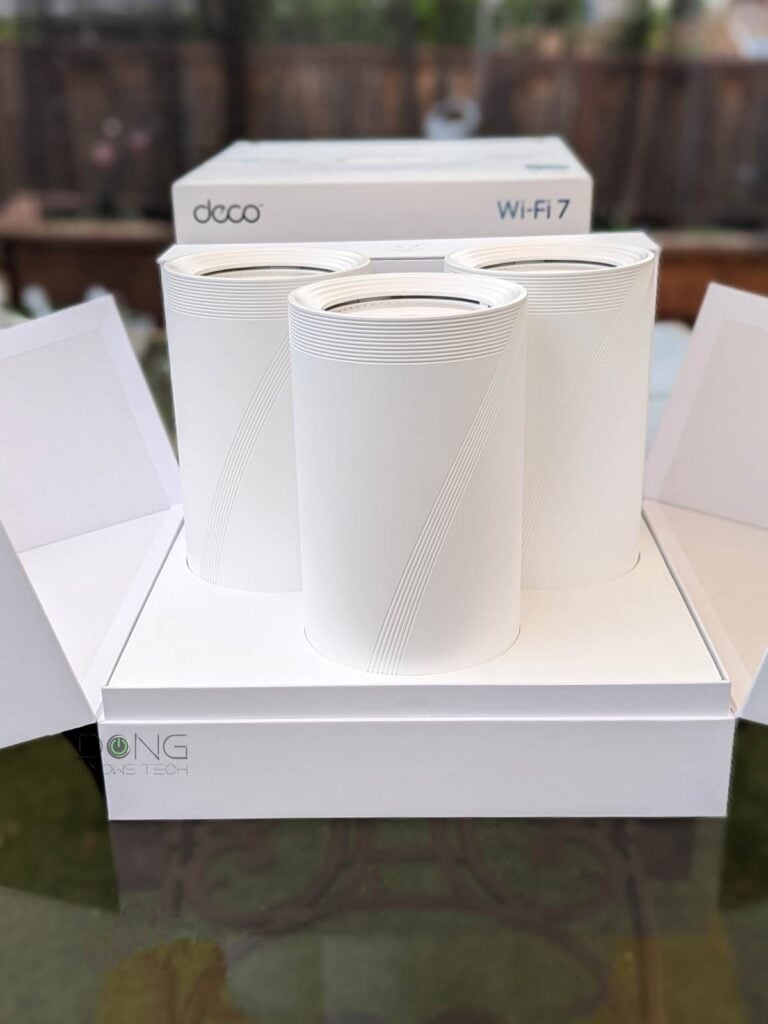
TP-Link’s Deco 7 Pro BE63, also known as Deco 7 Pro BE11000, is a mid-tier Wi-Fi 7 mesh system formerly known as the Deco 63—TP-Link made the change at the beginning of 2026. As if that’s confusing enough, it’s also available as the Deco BE65 Pro at some retailers, such as Best Buy, and then the outdoor version is the Deco 7 BE65 Outdoor.
Update
In early 2026, TP-Link quietly renamed its Wi-Fi 7 Deco hardware by adding “7, “7 Pro,” or “7 Elite” to their names. Specifically:
- Entry-level dual-band hardware gets “7”. For example, the Deco BE25 becomes Deco 7 BE25.
- Mid-tier tri-band hardware gets “7 Pro”. For example, the Deco BE63 becomes Deco 7 Pro BE63.
- Top-tier hardware gets “7 Elite”. The Deco BE85 and Deco BE95 become Deco 7 Elite BE85 and Deco 7 Elite BE95.
Since then, existing devices with the new names have their old names listed as suffixes following “formerly” or “also known as”.
As I have already done the in-depth review of the Deco 7 Elite BE85. This preview will help you understand how this lesser alternative compares to its higher-end older cousin. After all, as Decos, they are very similar.
The quick takeaway is that, at the current friendly price of just $500 for a 3-pack (often with deep discounts), the Deco 7 Pro BE63 (and all its variants) make a sensible fit for many homes, as long as you’re OK with an app-controlled mesh system.
Dong’s note: I first published this post on March 29, 2024, and updated it on February 2, 2026, with the latest information.

TP-Link Deco 7 Pro BE63: An entry-level multi-gigabit purpose-built mesh system
Like the Deco BE85, the Deco 7 Pro BE63 is a mesh system that includes identical routers with no additional band for backhauling. Each shares the same tube design but is smaller.
Still, it has the same number of ports, including four 2.5Gbps Multi-Gig auto-sensing WAN/LAN ports and a USB 3.0 port. Compared to the higher-end version, the Deco 7 Pro BE63 has no 10Gbps ports and doesn’t support SFP+, which is a minor point.
The table below shows the similarities and differences between the two.
TP-Link Deco BE63 vs. Deco BE85: Hardware specifications
As you will note, the Deco 7 Pro BE63 has less than half the Wi-Fi bandwidth of the Deco BE85, which makes its lack of support for 10Gbps Multi-Gig understandable—chances are its real-world rates won’t be much faster than 2.5Gbps anyway.
 |
 |
|
| Full Name | TP-Link Deco 7 Pro BE63 BE10000 Tri-Band Mesh Router | TP-Link Deco 7 Elite BE85 BE22000 Tri-Band Mesh Router |
| Model | Deco 7 Pro BE63, Deco 7 Pro BE11000, Deco B63, Deco BE65 Pro |
Deco BE85, Deco 7 Elite BE85 |
| Mesh Availability | 3-pack, 2-pack, or signle router | |
| Dimensions (each unit) |
4.23 × 4.23 × 6.93 in (107.5 × 107.5 × 176 mm) |
5.04 × 5.04 × 9.29 in (128 × 128 × 236 mm) |
| Processor | Undisclosed | |
| Wi-Fi Bandwidth | Tri-band BE10000 | Tri-Band BE22000 |
| 2.4GHz Band specs (channel width) |
2×2 AX: Up to 574Mbps (20/40MHz) |
4×4 BE: Up to 1376 Mbps (20/40MHz) |
| 5GHz Band Specs (channel width) |
2×2 BE: Up to 4324 Mbps (20/40/160/240MHz) |
4×4 BE: Up to 8640 Mbps (20/40/160/240MHz) |
| 6GHz Band Specs (channel width) |
2×2 BE: Up to 5188 Mbps (20/40/160/320MHz) |
4×4 BE: Up to 11520 Mbps (20/40/160/320MHz) |
| Backward Compatibility | 802.11a/b/g/n/ac/ax Wi-Fi | |
| Wireless Security | WPA2, WPA3 | |
| Mobile App | TP-Link Deco | |
| Web User Interface | Limited | |
| Bridge Mode | No | |
| AP Mode | Yes (as a mesh or a single unit) | |
| USB Port | 1x USB 3.0 | |
| Internal Fan | No | Yes |
| Gigabit Port (WAN/LAN auto-sensing) |
None | |
| Multi-Gig Port (WAN/LAN auto-sensing) |
4x 2.5Gbps (Deco BE63 or Deco Pro BE63) 3x 2.5Gbps (Deco BE65 Pro) |
2x 2.5Gbps 1x 10Gbps 1x 10Gbps / SFP+ Combo |
| Link Aggregation | None | |
| Firmware Version (at review) |
Not yet tested | 1.0.14 Build 20231124 Rel. 32537 |
| Power Input | 110-240V | |
| Power Consumption (per 24 hours) |
Not yet tested | ≈ 485 Wh (router unit) |
| Retail Price (at publication) |
$599.99 (3-pack) $349.99 (2-pack) $199.99 (single unit) $299.99 (outdoor unit) |
$1199.99 (3-pack) $799.99 (2-pack) $499.99 (single unit) |
A Wi-Fi 7 Deco variant
As part of the Deco family, the Deco 7 Pro BE63 shares the same feature set and management app as other Wi-Fi 7 Deco sets.
Specifically, you’re required to sign in with a TP-Link account and use the Deco mobile app as the only way to set up and handle the hardware. As a result, a live Internet connection is required for the setup process and ongoing management.
Additionally, managing your home router via a vendor-connected account increases inherent privacy risk.
TP-Link and your privacy
Signing in with a vendor-linked online account generally means your hardware connects to the vendor at all times, which translates into inherent privacy risks.
On this matter, the China-origin company, among other things, insists that it’s a “global multinational group” and offers this assurance:
“TP-Link takes privacy seriously and complies with U.S. policies to protect consumers.”
TP-Link’s Privacy Policy page.
Managing your home network via a third party is never a good idea. Privacy is a matter of degree. Data collection and handling vary vendor by vendor and region by region.
Other than that, in terms of Wi-Fi, you can expect the following:
- A primary SSID (network name) for the 2.4GHz and 5GHz bands via Smart Connect. A couple of things to note about this network:
- You can’t split these bands into two SSIDs, but you can turn off either band, making the network exclusively 2.4GHz or 5GHz.
- There is an option to set the 5GHz band to 80MHz, 160MHz (default), or the new 240MHz channel width.
- A second SSID for the 6GHz band—automatically takes the primary SSID’s name and adds the “-6GHz” suffix. You can change this name to anything you want, including the same as the primary SSID. (This is new since the Deco XE200 doesn’t allow the 6GHz to share the same SSID name as the others.)
- An optional third SSID with Wi-Fi 7’s Multi-Link Operation (MLO) feature. This SSID automatically has the “_MLO” suffix, but you can also name it to your liking. A couple of things to note:
- This SSID uses all three bands by default, but you can turn off the 2.4GHz band and use only the 5GHz and 6GHz bands.
- Wi-Fi 7 clients can connect to this SSID using two bands simultaneously to increase the bandwidth. Wi-Fi 6 devices can only use one band at a time.
- This SSID only supports WPA3 encryption, which generally doesn’t work with Wi-Fi 5 and older clients.
- Two optional Guest Network SSIDs, one for the 2.4GHz and 5GHz bands and the other for the 6GHz band. You can also name these networks to your liking as long as they are different from those used in #1, #2, or #3.
- An optional IoT Network SSID for the 2.4GHz band (default) or the 2.4GHz + 5GHz combo, which is a virtual SSID within the primary network for low-bandwidth smart devices.
As for the hardware, if you get a 2- or 3-pack, the units in the same set will be pre-synced—just pick one as the primary router, and the rest will work as satellites when plugged in. However, you can easily add more units to an existing setup. Generally, for a Wi-Fi 7 system, it’s best to use the same hardware units for a fully wireless setup, as that’s the only way to have the MLO feature in the backhaul link.
Additionally, considering the four 2.5Gbps ports, you can get a wired system with multi-gigabit backhauling right out of the box without getting a switch.
New to the idea of backhaul? Open this cabinet
When you use multiple Wi-Fi access points—in a mesh Wi-Fi system or a combo of a Wi-Fi router and an extender—there are two types of connections: fronthaul and backhaul.
Fronthaul is the Wi-Fi signals broadcast outward for clients or the local area network (LAN) ports for wired devices. It’s what we generally expect from a Wi-Fi broadcaster.
Backhaul (a.k.a. backbone), on the other hand, is the link between a Wi-Fi satellite unit and the network’s primary router, or between satellite units.
This link works behind the scenes to keep the hardware units together as a system. It also determines the ceiling bandwidth (and speed) of all devices connected to the particular Wi-Fi satellite unit.
- Hardware of Wi-Fi 6e, Wi-Fi 6, or Wi-Fi 5 standards uses one of its bands (2.4GHz, 5GHz, or 6GHz) for the uplink. In this case:
- When a Wi-Fi band handles backhaul and fronthaul simultaneously, only half its bandwidth is available to either end.
- When a Wi-Fi band functions solely for backhauling, often available traditional Tri-band hardware, it’s called the dedicated backhaul.
- Most Wi-Fi 7 satellite units can use multiple bands for the backhaul link thanks to the MLO feature.
For the best performance and reliability, network cables are recommended for backhauling—wired backhauling, which is an advantage of mesh Wi-Fi hardware with network ports. In this case, a Wi-Fi satellite unit can use its entire Wi-Fi bandwidth for the fronthaul.
Besides that, like other Decos, the BE63 has a standard set of networking settings, including Dynamic DNS (with a free domain from TP-Link), port forwarding, VPN (server or client), IPTV VLAN tagging (required by certain Internet providers), and the ability to work in the AP mode (as a single router or a mesh system.)
Basically, the Deco 7 Pro BE63 does the same thing as the Deco 7 Elite BE85 and other Wi-Fi 7 Decos. The only noticeable difference is in performance.
TP-Link Deco 7 Pro BE63: Entry-level multi-gigabit performance
As mentioned, I haven’t tested the Deco 7 Pro BE63, but its performance will likely be limited by its 2.5Gbps network ports—and that’s plenty fast in most cases, as most homes don’t have faster-than-Gigabit broadband connections.
In fact, for a home with slower-than-2.5Gbps broadband—Gigabit or Gig+—the Deco 7 Pro BE63 will deliver the same performance as higher-end, more expensive hardware, such as the Deco 7 Elite BE85 or BE95.
Tip
Gig+, or Gig Plus, denotes a speed grade between 1Gbps and 2Gbps. So, it’s 1.5Gbps, give or take a couple of hundred megabits per second, and it’s not speedy enough to qualify as Multi-Gig Ethernet or multi-Gigabit. Intel coined the term to describe its Wi-Fi 6E client chips, the AX210 and AX211, in terms of their real-world speeds.
Gig+ primarily applies to sustained Wi-Fi 6 or Wi-Fi 7 speeds via a 2×2 at 160MHz connection, or to broadband internet speeds.
However, if you want the fastest possible local bandwidth, especially in a wired backhauling setup, the Deco 7 Pro BE63 is decidedly inferior to higher-end hardware.
Pros
Four 2.5Gbps Multi-Gig ports, multi-Gigabit wired backhauling out of the box
Wi-Fi 7 support, backward compatible with existing clients; excellent overall real-world performance;
Cons
No 10Gbps ports or SFP+ support; mid-tier Wi-Fi 7 specs
Vendor-connected mobile app required; HomeShield Pro costs extra
Conclusion
The TP-Link Deco 7 Pro BE63 BE10000 Tri-Band Wi-Fi 7 mesh system—a.k.a. the Deco BE65 Pro, depending on where you are—is not meant to be the greatest and greatest. It’s not to replace the top-tier Deco 7 Elite BE85.
However, with four 2.5Gbps network ports and multi-Gigabit-capable Wi-Fi specs, it’s still an excellent Wi-Fi solution for most homes, especially those with 2Gbps or slower broadband, already wired with network cables. At $500 for a 3-pack, it’s definitely worth the consideration. Check it out today.